What your visitors’ unanswered questions are telling you
 Johnny BuiAug 18, 20264 min read
Most analytics tell you what people did. Unanswered questions tell you what they wanted — in their own words, at the exact moment they wanted it, unprompted and unfiltered by a survey.
If your site has a bot that logs the questions it could not answer, you are already collecting the most direct customer research available to a small company. Most teams never look at it.
Why this list is different from everything else in your analytics
Search-console keywords tell you what people typed into Google before they found you. Session recordings show you where a cursor hesitated. Surveys tell you what people say when asked a question you thought to ask.
An unanswered question is none of those. It is a real person, already on your site, already interested enough to type — hitting a wall you did not know was there. There is no sampling bias from a survey panel and no guessing at intent from a click path. The intent is the sentence.
And unlike a support ticket, it costs the visitor nothing to produce. Most people who cannot find an answer do not open a ticket. They leave. The log is where those silent exits become visible.
Four patterns, and what each one means
Read a week of unanswered questions and they sort themselves into four piles. Each pile has a different fix — this is the part teams get wrong, treating them all as "write more content."
1. The page does not exist. Ten people asked about annual billing; you have never written it down. Fix: write the page. This is the pile everyone expects, and usually the smallest.
2. The page exists but does not say it plainly. Your refund terms are in a paragraph about payment processing, three scrolls down. A human skimming would miss it; a retrieval system that scores passages will also miss it. Fix: give the fact its own heading and its own sentence. This pile is usually the biggest, and it is the cheapest to fix.
3. They used different words than you did. You wrote "seats." They asked about "users." You wrote "onboarding." They asked "how do I get started." Fix: add their words to your page — a plain-language line next to the term of art. You are not writing for a search engine; you are writing for the person who does not yet know your vocabulary.
4. It is genuinely not your product. Someone asked your scheduling tool about tax law. Fix: nothing. A healthy log has some of these, and a log with none of them suggests your bot is answering things it should be declining.
The weekly ritual that makes it compound
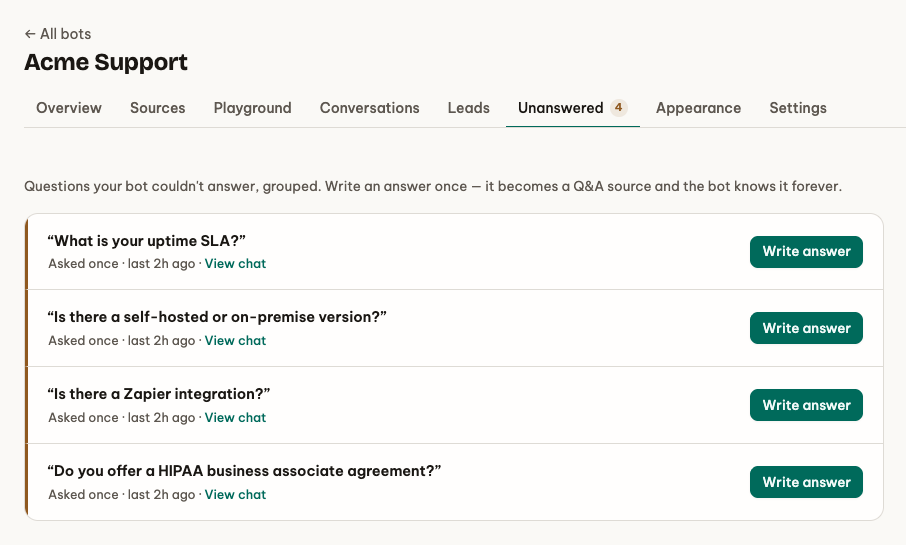
Fifteen minutes, once a week:
- Open the unanswered list, sorted by frequency.
- Take the top three. Assign each one to a pile above.
- For piles 1 and 2, make the edit now — most are one paragraph.
- Re-crawl. Ask the bot the original question yourself and read the answer.
Step 4 is the one people skip and the only one that closes the loop. You are not verifying that the page exists; you are verifying that a stranger's phrasing now reaches it.
Do this for a month and the list starts to get boring, which is the goal. The questions that remain are the ones worth building a feature for.
What it tells you beyond content
Read enough of these and the log stops being a content backlog and starts being a product signal:
- The same missing feature, asked as a question. "Can I export to CSV?" ten times in a week is a roadmap item wearing a question mark.
- A pricing model people cannot map onto themselves. If visitors keep asking which plan fits them, your pricing page is describing your plans instead of describing them.
- A promise you made somewhere else. Questions about a thing you no longer offer usually trace back to a stale ad or an old blog post still ranking.
None of this requires a data team. It requires reading the list.
The honesty prerequisite
All of this depends on one thing: your bot must be willing to say it does not know. A bot that always produces an answer produces no list at all. Its silence is not evidence of a well-documented site — it is evidence that you have no idea how often it is wrong.
That is the quiet argument for grounded answers. The refusals are not a shortfall to be minimised. They are the output you were not collecting before.
Embent logs every question it could not ground, groups the near-duplicates, and shows you the list ranked by how often it came up — so the fifteen minutes above is the entire workflow.