How to put an AI agent on your site in 15 minutes
 Johnny BuiAug 25, 20264 min read
This is the whole setup, start to finish. No integration project, no data pipeline, no engineer required. If you can paste a line into your site's template, you can finish this before your coffee gets cold.
Before you start
You need two things: the URL of the site you want the agent to answer about, and the ability to paste one line of HTML into it. That is it. No API keys, no database, nothing to install.
If your site runs on WordPress, Shopify, Wix, Squarespace, Webflow, Framer, or anything with a "custom code" or "footer scripts" box, you have everything you need — and we keep step-by-step install guides for each platform, including Google Tag Manager for sites where you can't even touch the code.
1. Point it at your site (about 1 minute)
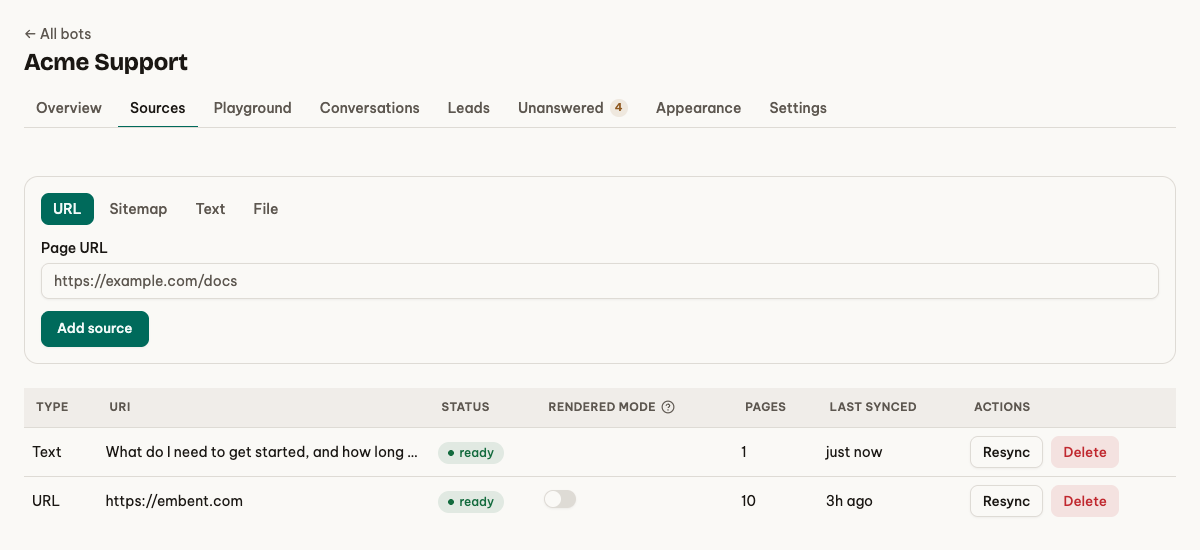
Sign up, then give the agent your site's URL — usually your homepage.
Our crawler starts there and follows links within your domain, respecting robots.txt. It reads your pages — marketing site, documentation, blog — and converts each into searchable content. Have PDFs or other files? Upload them as file sources alongside the crawl. You do not tag anything, structure anything, or write a knowledge base. The site you already have is the knowledge base.
Two things worth knowing while it runs:
- A sitemap is not required, though if you have one you can point at it directly to be exhaustive.
- If a page comes back empty, that page probably renders with JavaScript. Turn on rendered mode for that source and it will be re-read in a real browser.
2. Watch it read (2 to 10 minutes)
Crawling takes a few minutes for a typical marketing site, longer for a large documentation set. You can watch pages arrive as they are indexed.
You do not have to wait for the whole thing before testing. Once a handful of pages are in, the playground works.
3. Ask it the questions you get asked (about 3 minutes)
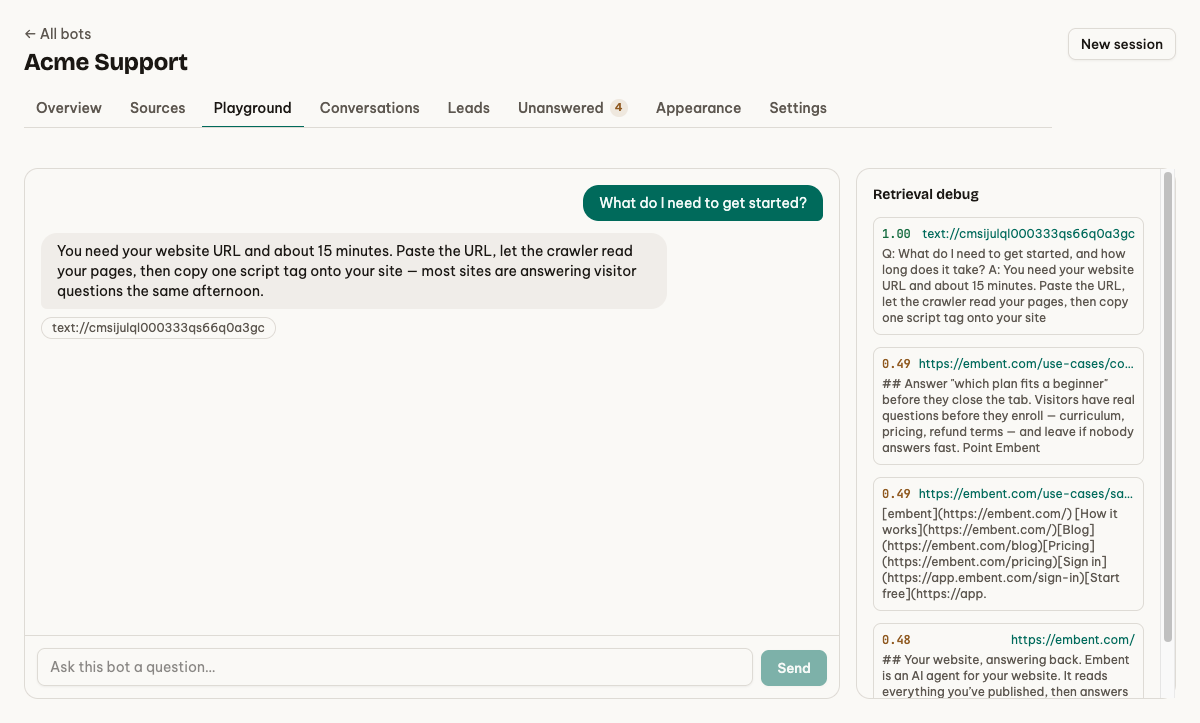
This is the step to not skip. Open the playground and ask the five questions your customers actually ask — the ones you have answered by email a hundred times.
Read the answers with two things in mind:
- Is there a citation? Every factual claim should carry a link. If one is missing, the answer was not grounded, and you want to know that now rather than in front of a customer.
- Does it decline when it should? Ask something your site genuinely does not cover. You want "I couldn't find that," not a confident invention. If you get the invention, you have learned something important about the tool you are evaluating — including if that tool is ours.
Whatever it gets wrong here tells you which page to improve, and that is a two-minute edit, not a project.
4. Make it look like you (about 2 minutes)
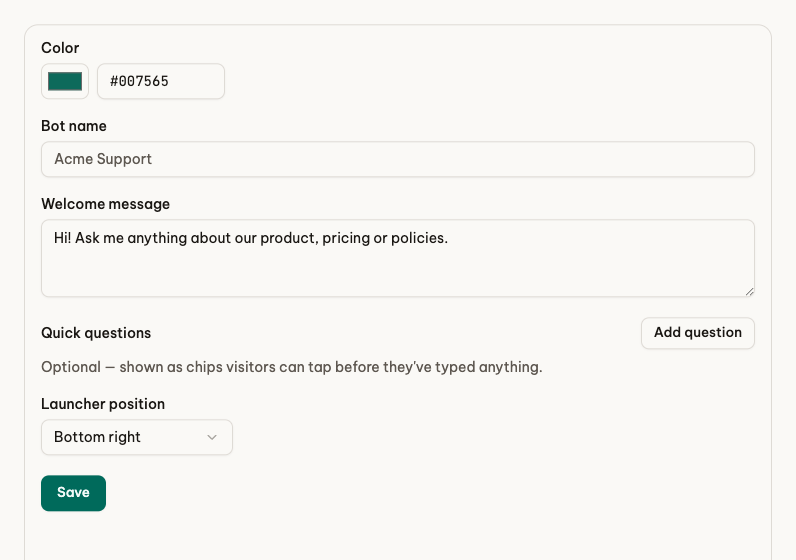
Set the accent colour to your brand's, write a welcome line in your voice, and pick a corner. The widget renders in a shadow DOM, which is the technical way of saying it cannot break your site's CSS and your site's CSS cannot break it.
Decide one thing while you are here: whether the agent should ask for an email when a visitor shows buying intent, and how forward it should be about it. Off, on-intent, always, or a short form before the chat starts — whichever matches how you want to treat strangers.
5. Paste one line (about 30 seconds)
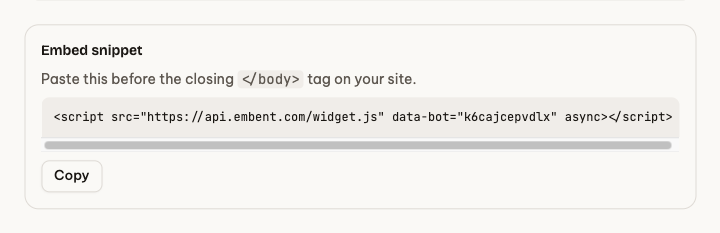
Copy the snippet and paste it before your closing </body> tag:
<script src="https://api.embent.com/widget.js" data-bot="your-bot-id" async></script>
The async attribute matters: the script never blocks your page from rendering. The whole bundle is under 50 KB gzipped and it loads no fonts and no frameworks.
Refresh your site. The launcher is in the corner. You are live.
After you are live
The part that makes this worth doing starts now, and it takes fifteen minutes a week:
- Read the unanswered questions. They are the gaps in your site, written by the people who hit them.
- Read a few conversations. You will learn more about how people describe your product in ten transcripts than in a month of guessing.
- Re-crawl when you publish. Only changed pages are re-indexed, so it is cheap and fast.
What "15 minutes" leaves out
Honesty about the number: 15 minutes gets a good agent live on a normal marketing site. A 400-page documentation set takes longer to crawl, and a site that renders everything client-side needs rendered mode turned on, which is slower.
What does not vary is the shape of the work: paste a URL, check the answers, paste a script tag. There is no configuration project hiding behind it.
Start free at embent.com — no card needed.